miragechat.io
MirageChat
Every client message in one inbox — answered faster with AI.
MirageChat brings WhatsApp, Instagram, Messenger, Telegram and website conversations into one shared team inbox, with AI replies grounded in the business's own information, a client CRM, automations, analytics and scheduled social publishing — on the web and in the MirageCHAT apps for iOS and Android.
Live platform status
MirageChat Platform
Operational
Application Services
Operational
API Services
Operational
Messaging Services
Operational
Last checked under a minute ago
View Operations CenterThe problem
Business conversations are fragmented
- Businesses communicate across multiple channels — WhatsApp, Instagram, web chat, phone.
- Messages become fragmented across devices, accounts and people.
- Teams lose context, and the history disappears with whoever handled it.
- Customers expect faster responses than a manual process can sustain.
The solution
One intelligent communication layer
MirageChat connects the parts that normally live apart:
Customer channels
Official messaging platforms, unified into one queue.
AI assistance
Grounded answers for the conversations that repeat.
Automation
Rules, routing and coverage outside working hours.
Human teams
Escalation with the full context already attached.
How MirageChat works
From customer channels to business outcomes
Conversations arrive from the channels your customers already use, pass through one platform where AI handles what repeats, and reach your team with the context already attached.
Every module
Everything MirageChat does, module by module
MirageChat is one workspace for client conversations, AI-assisted replies, social publishing and team operations — on the web and in mobile apps for iOS and Android. Each module below is described the way the product describes it, including the conditions a platform or plan places on it.
Unified Team Inbox
AvailableWhatsApp, Instagram, Messenger, Telegram and website chat in one shared queue, with assignment, notes, reminders and a complete history for every client.
- One queue for every connected channel
- Assignment, tags, private notes and snooze
- Media, delivery state and full conversation history in context
- Web and mobile access with the same workspace permissions
Grounded AI Assistant
AvailableDrafts or sends replies in the client's own language from the business information the team controls — and hands the conversation to a person when that information does not support an answer.
- Suggestion, automatic and off modes, set per account
- Answers grounded in the workspace knowledge base
- On-demand translation of incoming messages, keeping the original
- Human handoff instead of an invented price or policy
Instant Post
AvailablePublish a post, several stories or a reel to selected social accounts from one screen, with reusable account groups and a delivery result for each destination.
- Accounts chosen one by one or as saved groups
- Post media reused for a Story or a Reel
- Instagram carousels; Facebook multi-photo publishing is under Meta review
- Retry targets only the destination that failed
Social Auto Pilot
Instagram live · Facebook under Meta reviewRecurring Instagram content from an organised media library — daily plans, AI-written captions, review mode and publishing history. Facebook Page posting is under Meta review; TikTok depends on platform approval.
- Media libraries organised per brand or account
- Daily plans with review mode or automatic publishing
- Posts, stories and reels where the platform permits them
- History, status and actionable failure reasons
Client CRM
AvailableEach client's conversations, channels, tags, notes and interaction history in one record, so any teammate can continue with the full context.
- One contact record across connected channels
- Tags, notes and conversation history
- The client profile opened from any conversation
- Searchable records for follow-up
Replies, Workflows and Campaigns
Available by moduleStandardise repetitive communication with saved replies, deterministic auto-replies, sequences, visual workflows and broadcasts that respect consent.
- Saved replies with text, links and media
- First-message and out-of-hours auto-replies, per channel and account
- Visual workflows and scheduled follow-up
- Broadcasts that enforce opt-outs before delivery
Analytics and SLA
Available by planThe wait clients actually experienced, response performance, workload and outcomes — by period, channel and teammate.
- Response time measured from the client's unanswered message
- Team, channel and period views
- Waiting and escalation visibility
- Sentiment and wait-time alerts
WhatsApp Business Tools
With a connected accountOperate a WhatsApp Business channel: approved templates, rich messages, the business profile, scan-to-chat QR codes and delivery status — connected through a guided flow, without building a Meta app.
- Template creation and approval tracking
- Images, files, voice, location and interactive buttons and lists
- Business profile and QR-code management
- Delivery, read and opt-out handling
Instagram Messaging and Comments
With approved accessInstagram direct messages, story interactions and supported comment actions in the same workspace, within the permissions Meta grants the account.
- Direct messages and story mentions
- Reply to, hide or delete supported comments
- Move a public comment to a private reply where permitted
- Inbox, posting and insight abilities checked per account
Team Collaboration
AvailableA shared service desk: individual accounts, role-based access, assignment, private notes, announcements and consistent saved answers.
- Individual accounts and role-based permissions
- Assignments and private notes
- Saved replies managed by administrators
- Team announcements delivered to agent devices
Integrations and API
By plan and permissionConnect a PMS, CRM, booking engine, website or app: embedded operational panels inside conversations, scoped API keys and webhooks, documented in an authenticated developer manual.
- Scoped API keys instead of user passwords
- Webhooks for supported real-time events
- Embedded operational panels inside a conversation
- Reseller use where contracted and enabled
Security, Consent and Audit
AvailableWorkspace boundaries, scoped access, a tamper-evident audit trail and marketing opt-outs enforced in the delivery path.
- Isolated workspace data and scoped access
- Audit records linked in a tamper-evident chain
- Automatic STOP and START handling
- Data export and deletion controls
MirageCHAT Mobile Apps
iOS and AndroidThe same workspace on iPhone, iPad and Android — with role-based access, push notifications, offline-aware replies and a secure app lock.
- Published on the App Store and Google Play
- Same workspace, accounts and permissions as the web app
- Grouped notifications with Reply, Close and Pending actions
- Optional biometric or PIN app lock
Questions
MirageChat — frequently asked questions
Which channels does MirageChat connect?
WhatsApp, Instagram, Messenger, Telegram and website chat are available now, in one shared inbox. SMS depends on provider access and account setup.
Can the AI invent a price or a policy?
It is instructed to answer only from the business information the team provides, and to hand the conversation to a person when that information does not support an answer. Suggestion mode lets an agent review every draft before it is sent.
Is there a mobile app for the team?
Yes. MirageCHAT is published on the App Store and Google Play, and uses the same workspace, connected accounts and permissions as the web app.
Can MirageChat publish to social media?
Yes. Instant Post publishes now to selected accounts, and Social Auto Pilot runs recurring Instagram plans from a media library. Facebook Page posting is under Meta review; TikTok depends on platform approval.
Does MirageChat add a fee on WhatsApp messages?
No. Meta applies its own conversation charges to the customer's WhatsApp account; MirageChat adds no percentage markup to them.
Can MirageChat be connected to our own systems?
Yes, by plan and permission: scoped API keys, webhooks and embedded operational panels, documented in the authenticated developer manual inside the product.
Architecture
Built as a platform, not a bundle of tools
The business view above is the whole story for most teams. For engineering teams evaluating MirageChat, the platform tiers are outlined below.
Technical architecture
Platform tiers only. Infrastructure specifics are not published.
The product
Inside MirageChat
Captures of the running product, not illustrations.
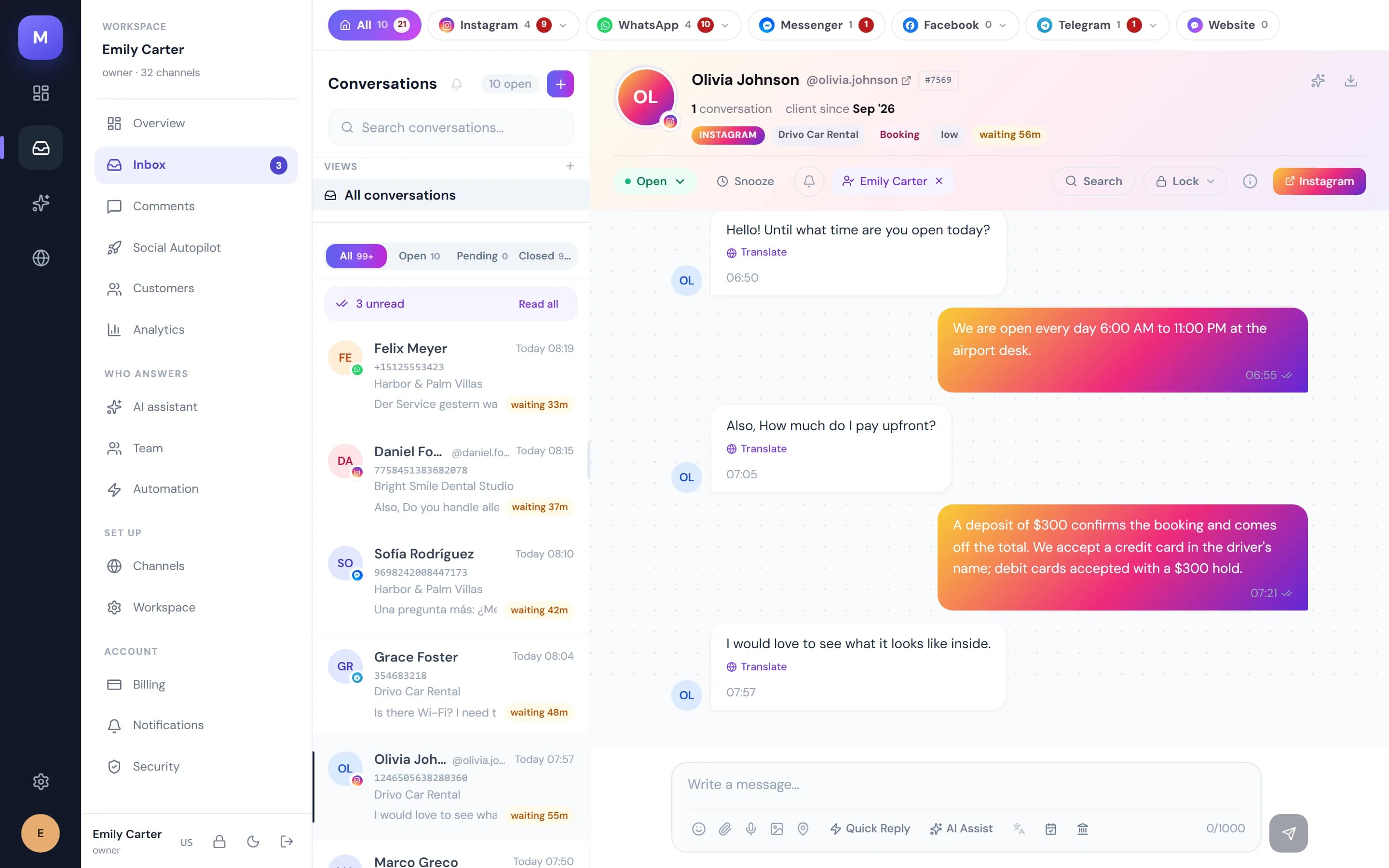
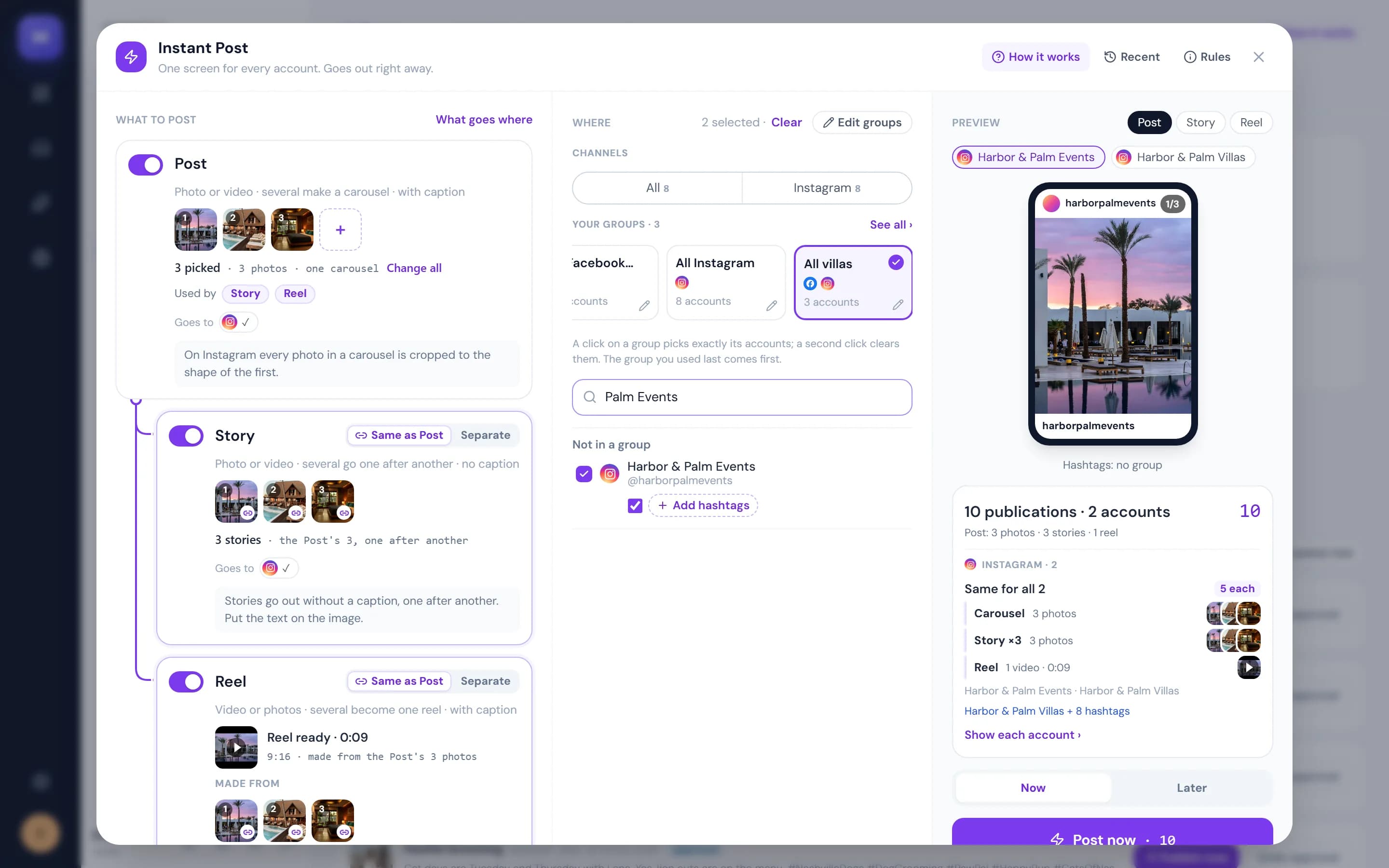
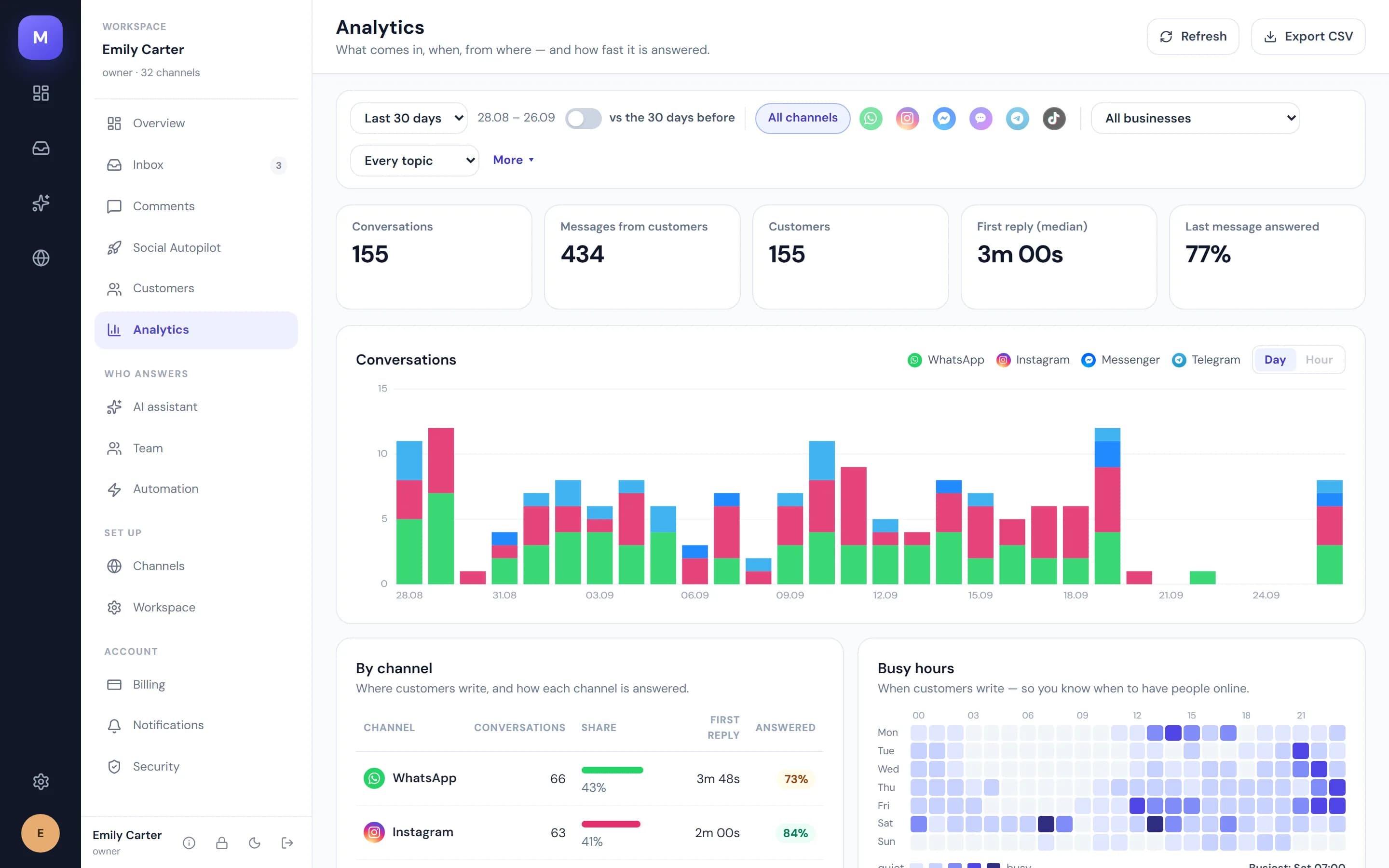
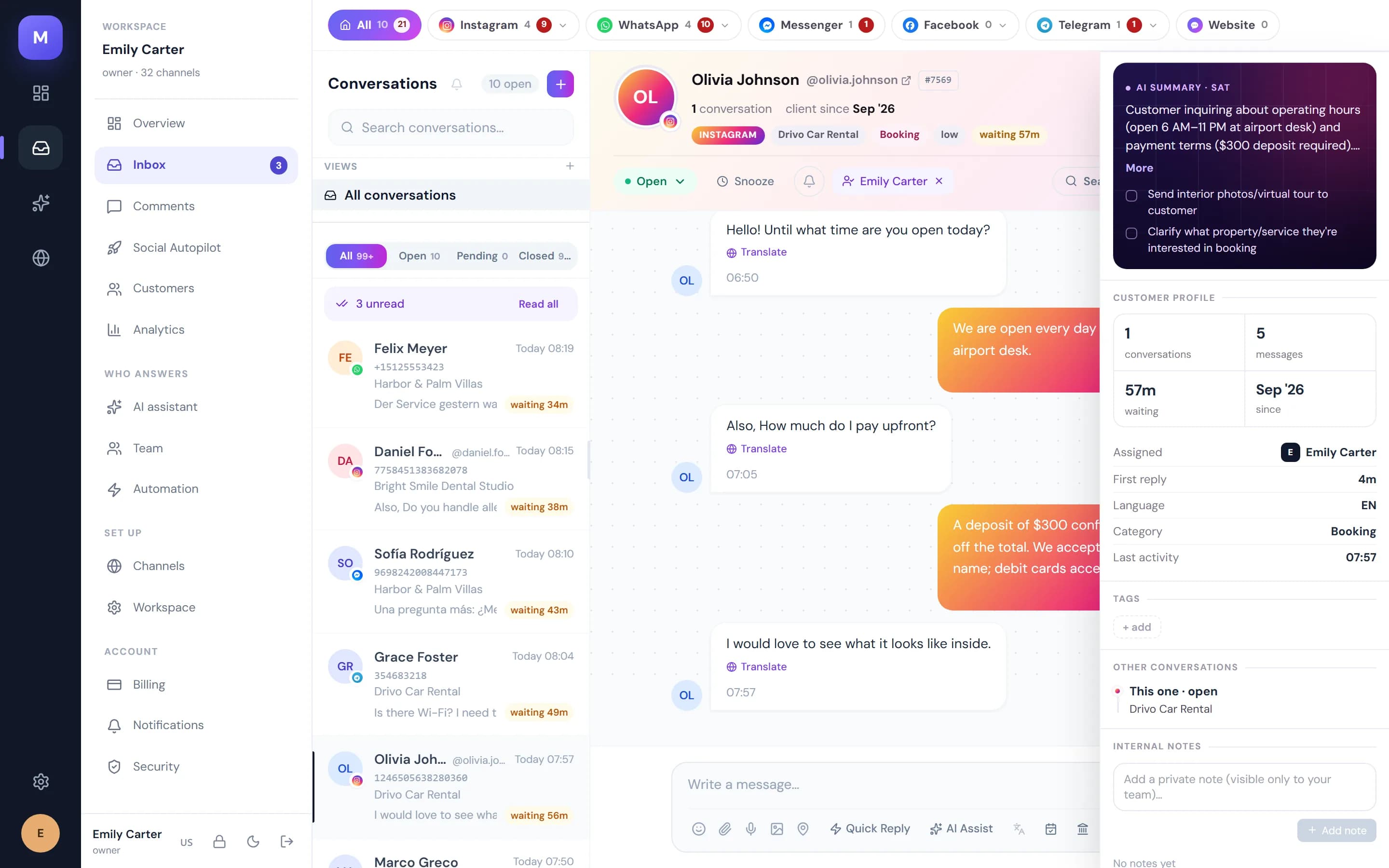
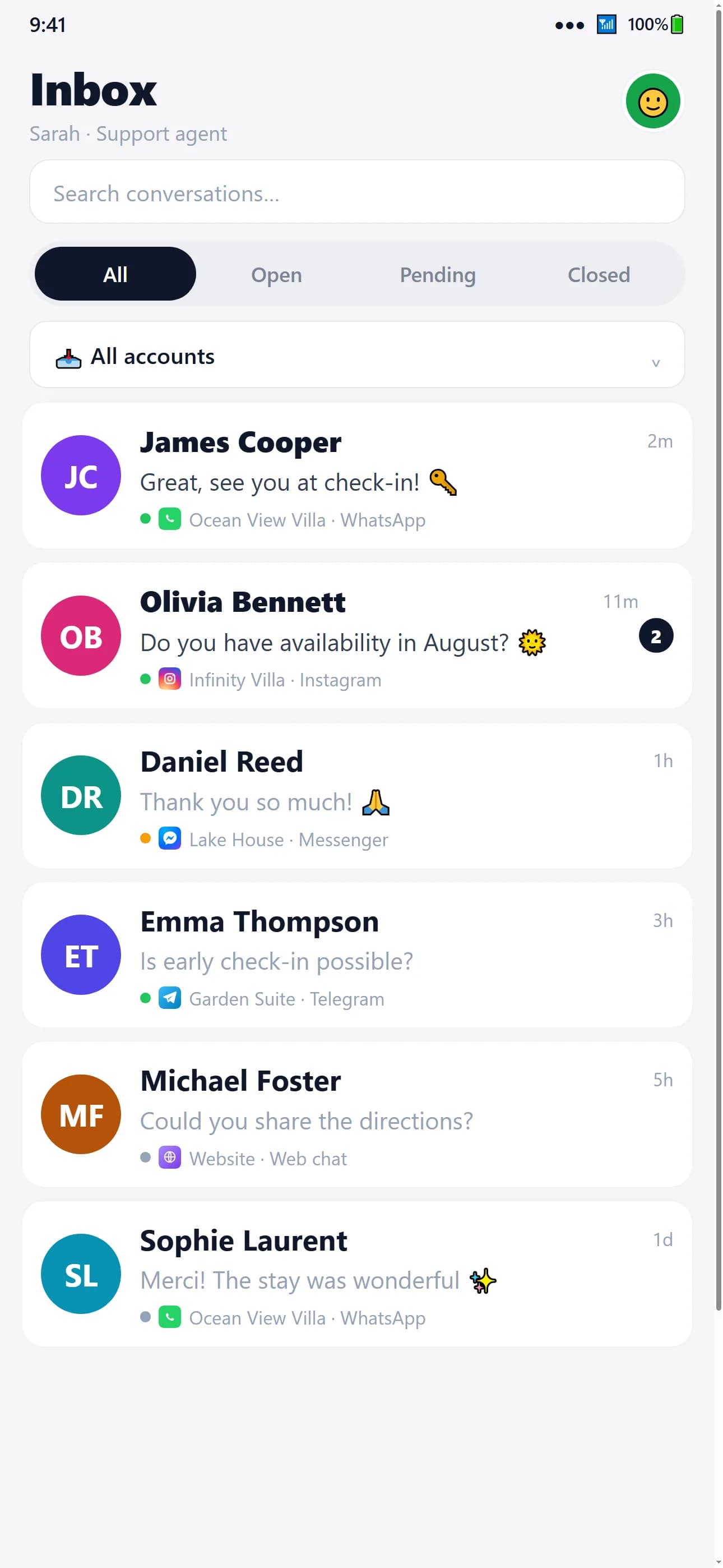
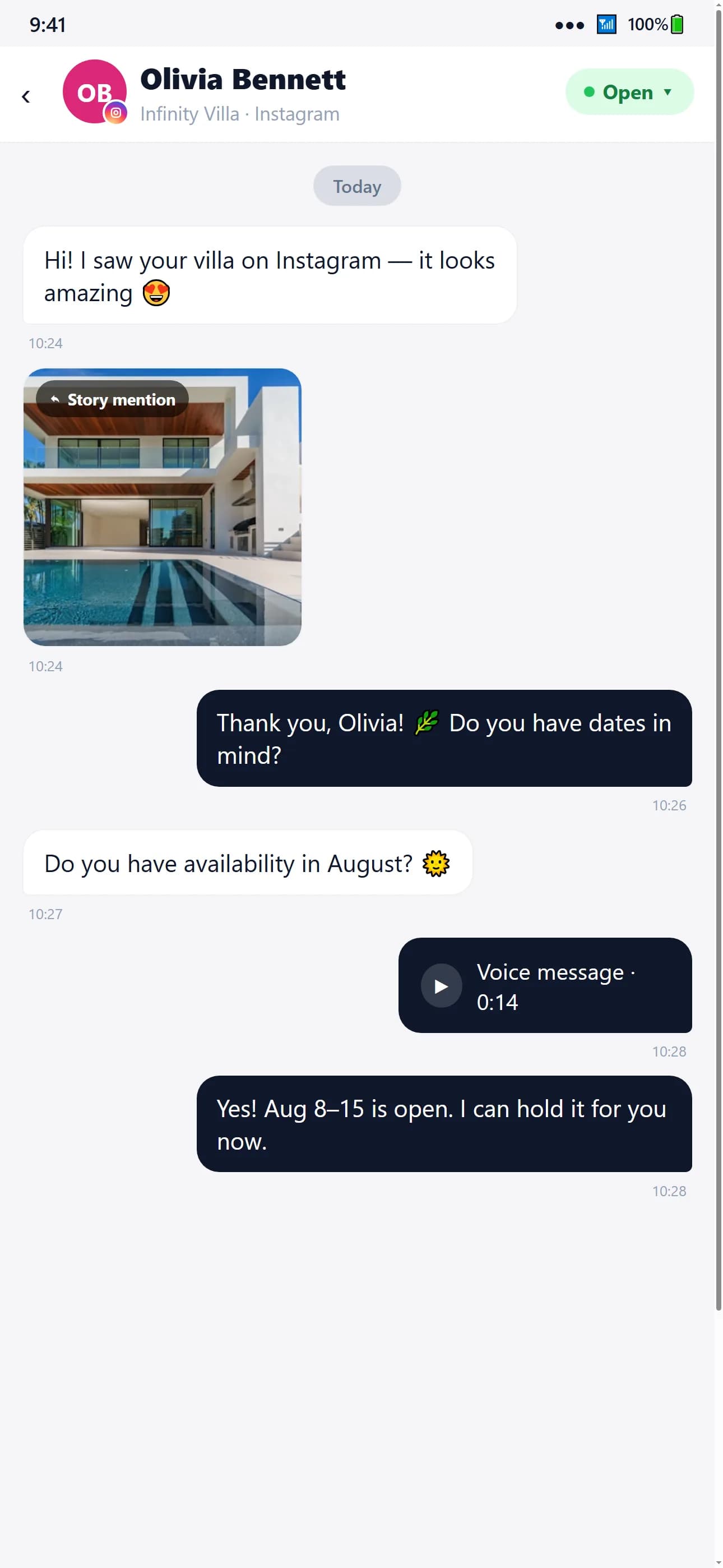
The four desktop views are captures of the running product, taken on 26 September 2026 in a showcase workspace holding only fabricated data — no customer, message or figure is real. The two phone views are the screenshots published on the MirageCHAT App Store listing for version 1.4.0.
Reliability
Built for reliable operations
The platform is designed so that updates and instance restarts do not interrupt service, and it is monitored continuously — with status published publicly.
- Multiple application instances serve traffic together
- A shared session layer keeps conversations continuous across instances
- Updates are rolled out progressively rather than all at once
- Continuous monitoring with public status reporting
Security
- TLS encryption in transit across all channels and APIs
- Role-based access control for teams and workspaces
- Audit logging of administrative and data actions
- Encrypted backups
- Data processing aligned with the messaging platforms' policies
Use cases
Where MirageChat operates
Hospitality
Guest requests, bookings and upsells handled from one desk, with AI covering the hours a team cannot.
E-commerce & Retail
Pre-sale questions, order status and post-purchase support resolved without a person reading every message.
Service businesses
Appointments, quotes and follow-ups run as structured conversations instead of missed calls.
Bring MirageChat to your operation.
Talk to the enterprise team about deployment, integration and partnership — or see the platform for yourself.
Or write to sales@mirageglobaltech.com